
 Redaction Tools
One name, 54 ways: where PDF redaction tools stop reading
We planted one name 54 times on a PDF page, rotated, stacked, scanned and handwritten, and ran four redaction tools over it. Every tool removed the easy 13. The rest separated them.
12 min read
Mykola Melnyk
Maintainer, Redaction Tools
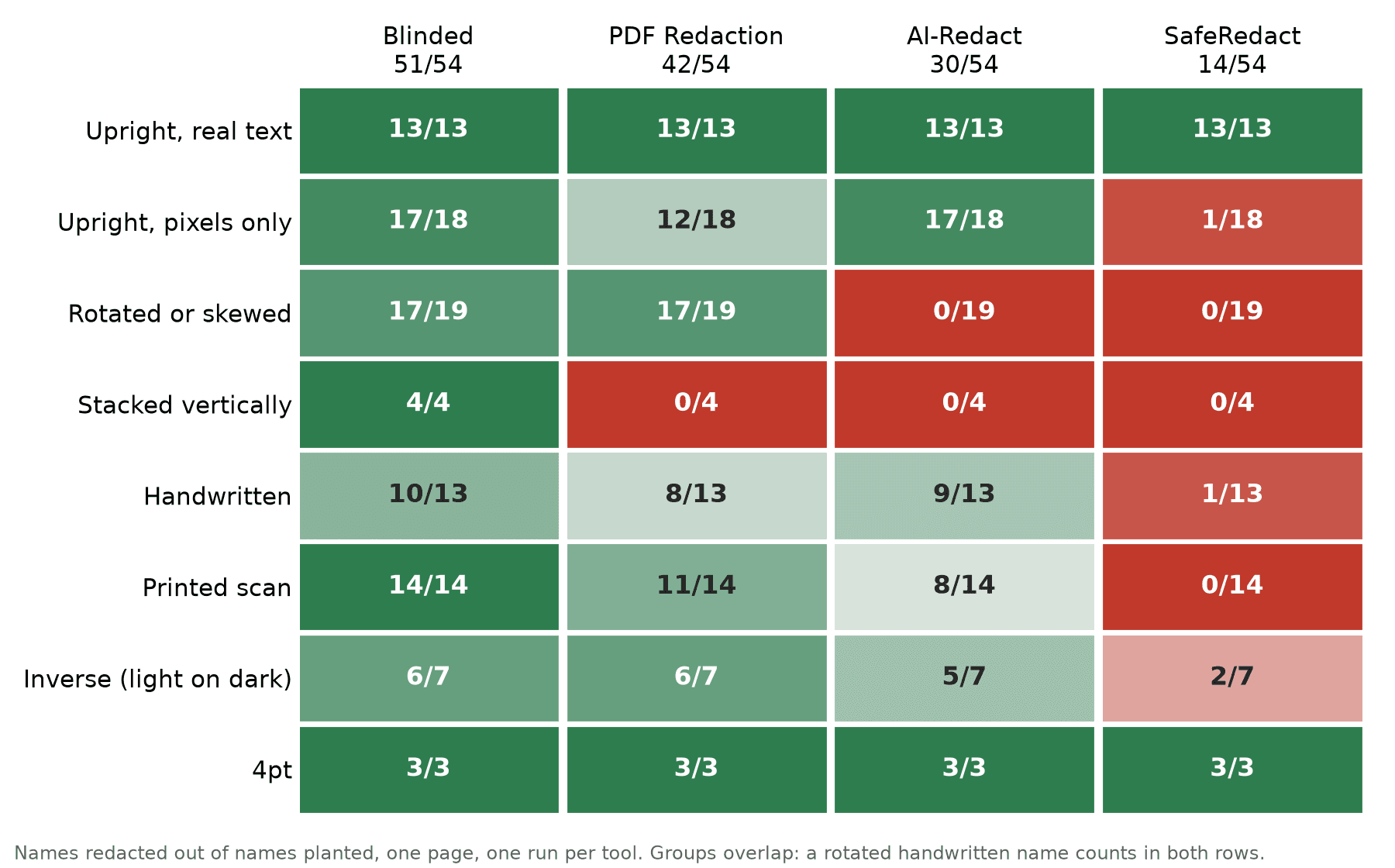
TL;DR: A redaction tool can only remove text it has managed to read. To find out what four tools can read, we wrote one invented name 54 times on a single PDF page. Each copy is rotated, stacked, scanned, handwritten, shrunk or recoloured in a different way. All four tools removed all 13 upright copies stored as ordinary text. Beyond those, the results ranged from 51 of 54 names removed down to 14. Two tools removed none of the 19 rotated names. Three removed none of the vertically stacked ones.
This post assumes you know what a PDF text layer is and roughly how OCR works. It covers how the page is built, what each tool did with it, and how far one page can be trusted.
Why test reading separately
When a redaction tool misses a name, there are two possible causes. Either it never read the name, or it read the name and decided not to remove it. From the outside, both leave the same visible name on the page. Most comparisons stop there, because a vendor demo gives you nothing more to look at.
A test can separate the two causes by changing how a value is presented while keeping what it is the same. Our page uses one invented person, Freya Yamamoto, and nothing else. Any reasonable tool should flag her name as soon as it reads it. So if a copy of the name survives, the likeliest explanation is that the tool never read that copy, not that it judged the name harmless.
The name is a person's name on purpose. Names are what every redaction tool claims to find, so detection quality is held constant and only reading varies.
The test page
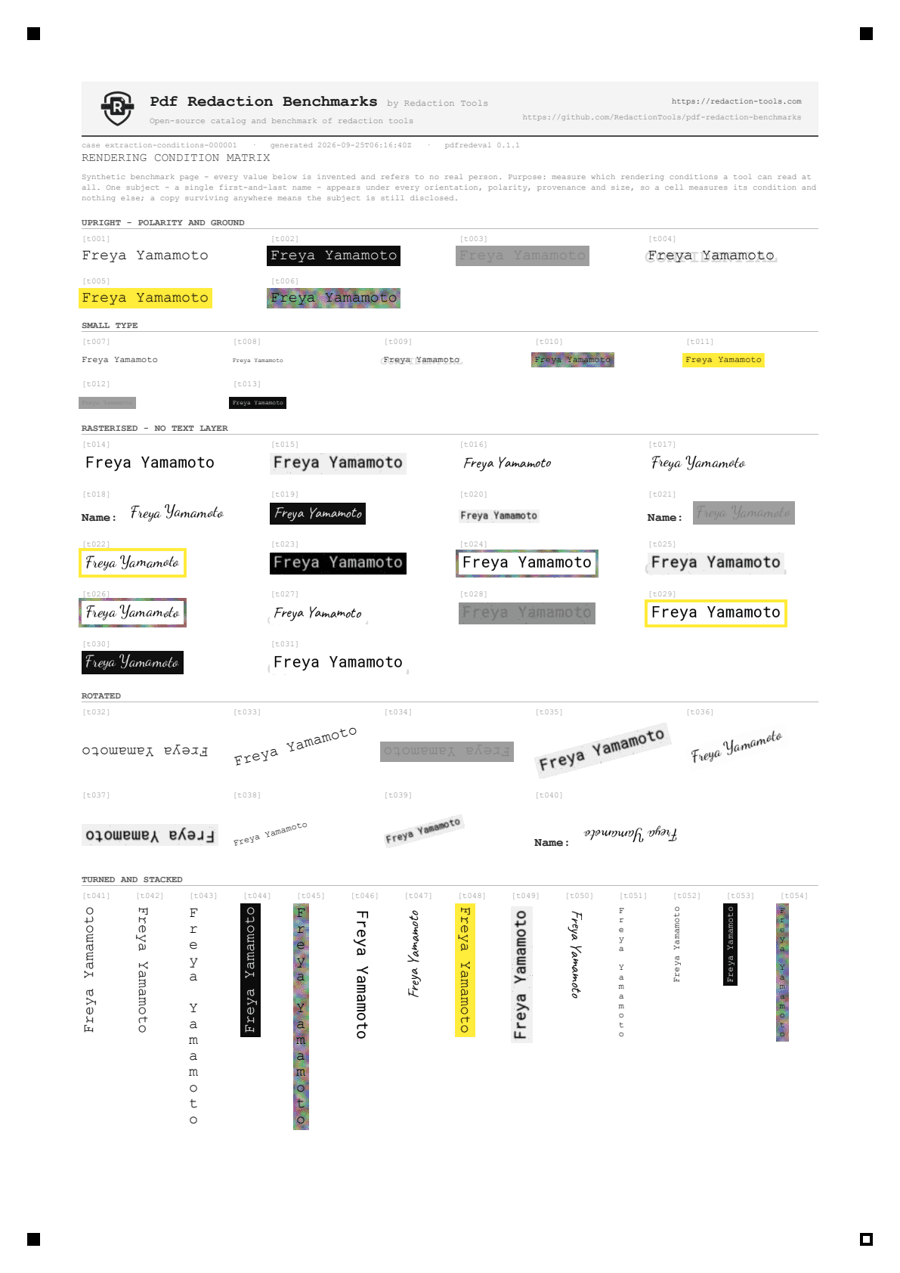
The page is extraction-conditions-1 from pdfredeval
0.1.1, our open-source benchmark harness. It was generated from seed 1. Every copy of the
name is a probe, and each probe is tagged on four axes:
| Axis | Levels |
|---|---|
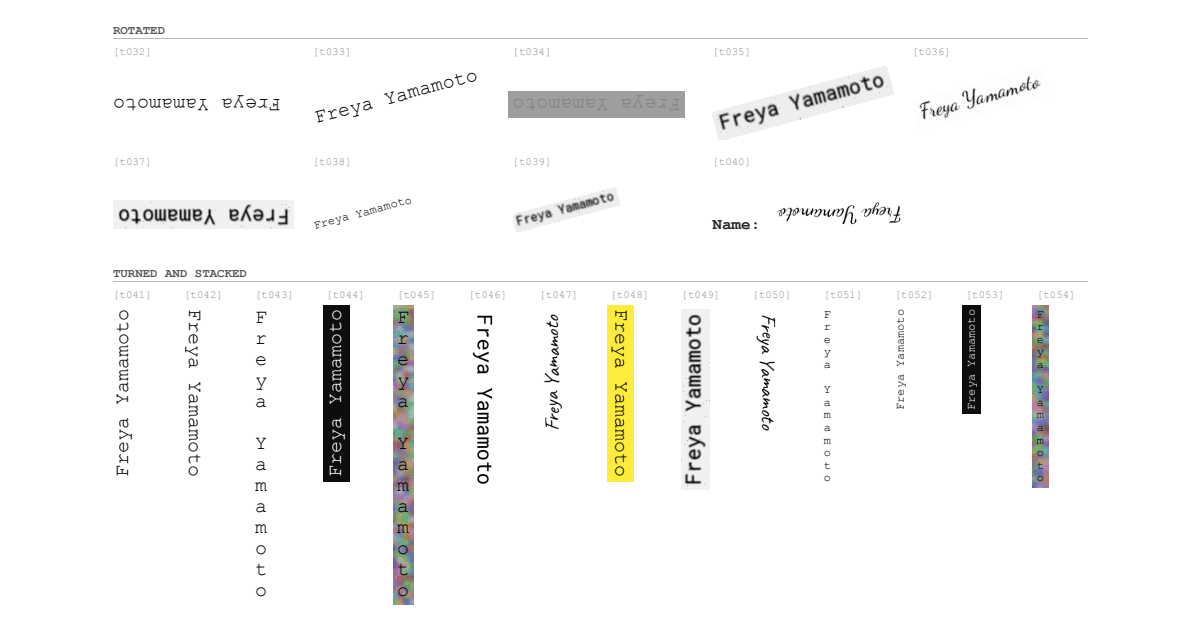
| Orientation | horizontal, rotated 90° / 180° / 270°, skewed, vertical (upright glyphs stacked top to bottom) |
| Polarity | dark on light, inverse, low contrast, over a watermark, on a highlight, over a photograph |
| Provenance | real vector text, clean print scan, degraded scan, handwritten block, cursive, form (mixed) |
| Scale | 10pt, 6pt, 4pt |
Half of the 54 probes exist only as pixels, with no text layer behind them. For those, OCR is the only way a tool can find the name. The other half are real text that any PDF parser can read.
Two of the levels need a word of explanation:
- Vertical is not the same as rotated by 90°. A rotated line of text can be read by
turning it back upright. A vertical stack (
F/r/e/y/a) has letters that are already upright, so turning it only turns each letter sideways. A tool can handle 90° rotation and still score zero on vertical stacks. On this page, the four stacked names are real text, not pixels. - Inverse text is what a redaction tool produces. A tool that draws a black box over text that can still be selected has created light-on-dark text. A leak checker that cannot read inverse text will call that box safe, so our checker has to read it.
Testing every combination of the four axes would take hundreds of cells, more than fit on one page. So the page varies one axis at a time against a plain baseline. It then adds the combinations that come up in real documents: a photographed handwritten note (skew × cursive), a page scanned upside down (180° × degraded scan), a watermarked scan, and faint fine print. A few three-way combinations are included too, because failures compound.
How a leak is decided
The tools were tested as black boxes. Each one received the PDF through its normal web interface, and we scored only the PDF it handed back. No tool reported a list of what it found. That means we cannot tell a value the tool never saw from one it saw but did not remove. Every result in this post is therefore a redaction result. Reading ability is inferred from which conditions the tool consistently fails.
A probe counts as leaked if its value can be recovered from any layer of the output:
- Rendered pixels: the page is drawn at 300 DPI and we measure how much of each glyph is still visible.
- Content stream: what copy-paste,
pdftotextor any parser can pull out of the file. - OCR: Tesseract 5.5.2 run over the rendered output. This catches translucent and hairline covers.
- Everything else: metadata, annotations, attachments, earlier saved revisions, hidden layers. None of these leaked on this page.
The four squares in the page corners are alignment markers. They let the scorer map each probe's position onto the output even when a tool rescales or shifts the page. That matters for one of the tools below.
Results
| Tool | Names removed | Leak rate, 95% interval | Text retention | Run | How it was scored |
|---|---|---|---|---|---|
| Blinded | 51/54 | 0.06 [0.02, 0.15] | 0.876 | 2026-10-04, by its owner | Scored by us |
| PDF Redaction | 42/54 | 0.22 [0.13, 0.35] | 0.932 | 2026-09-25, by us | Self-scored · verified |
| AI-Redact | 30/54 | 0.44 [0.32, 0.58] | 0.951 | 2026-09-25, by us | Self-scored · verified |
| SafeRedact | 14/54 | 0.74 [0.61, 0.84] | 0.000 | 2026-09-25, by us | Self-scored, unverified |
These are the figures on the live leaderboard for dataset revision v0.1.1. The intervals are Wilson score intervals. With 54 probes, the range of plausible true values is wide. The intervals for Blinded and PDF Redaction overlap, so this page alone cannot settle which of the two is ahead. The other gaps are wider than the intervals.
The last column is the site's trust badge.
- Scored by us: the output PDF was uploaded and our server scored it.
- Self-scored: the PDF was scored with the pdfredeval CLI and then sent in. The server rescores it, and "verified" means the two agreed exactly.
- SafeRedact is unverified: our rescore did not finish. Its output is one large image, and the OCR pass timed out on it after 120 seconds. The 14/54 is the CLI's score, and no second score exists. Its overlay and output PDF are on the run page, so you can check them by eye.
Blinded does not detect names on its own. It extracts the page's text, including text it reads by OCR, and redacts what a user searches for. In this run the name was typed into its search, and Blinded removed every copy it could match. Its 51/54 measures how much of the page it can read and match. It says nothing about finding a name nobody searched for, because Blinded has no feature that does that. On a real document, someone has to know every name to search for.
Four findings stand out from the totals.
1. On upright text, the tools are identical
All four tools removed 13 of 13 upright copies stored as real text, and 3 of 3 at 4pt. We expected the 4pt copies to separate the tools, and they did not. A demo on an ordinary born-digital PDF would show four tools that look the same. Every difference in the table above comes from the other 41 probes.
2. Two tools redact only upright text
AI-Redact removed 30 of 31 upright names and 0 of 23 names that were rotated, skewed or stacked. The cause is not a lack of OCR. It removed 17 of 18 upright names that exist only as pixels, so it reads images well as long as the text is level. SafeRedact also removed 0 of 23. The output PDFs themselves show more than the counts do. Here is the bottom of the page as each tool returned it:
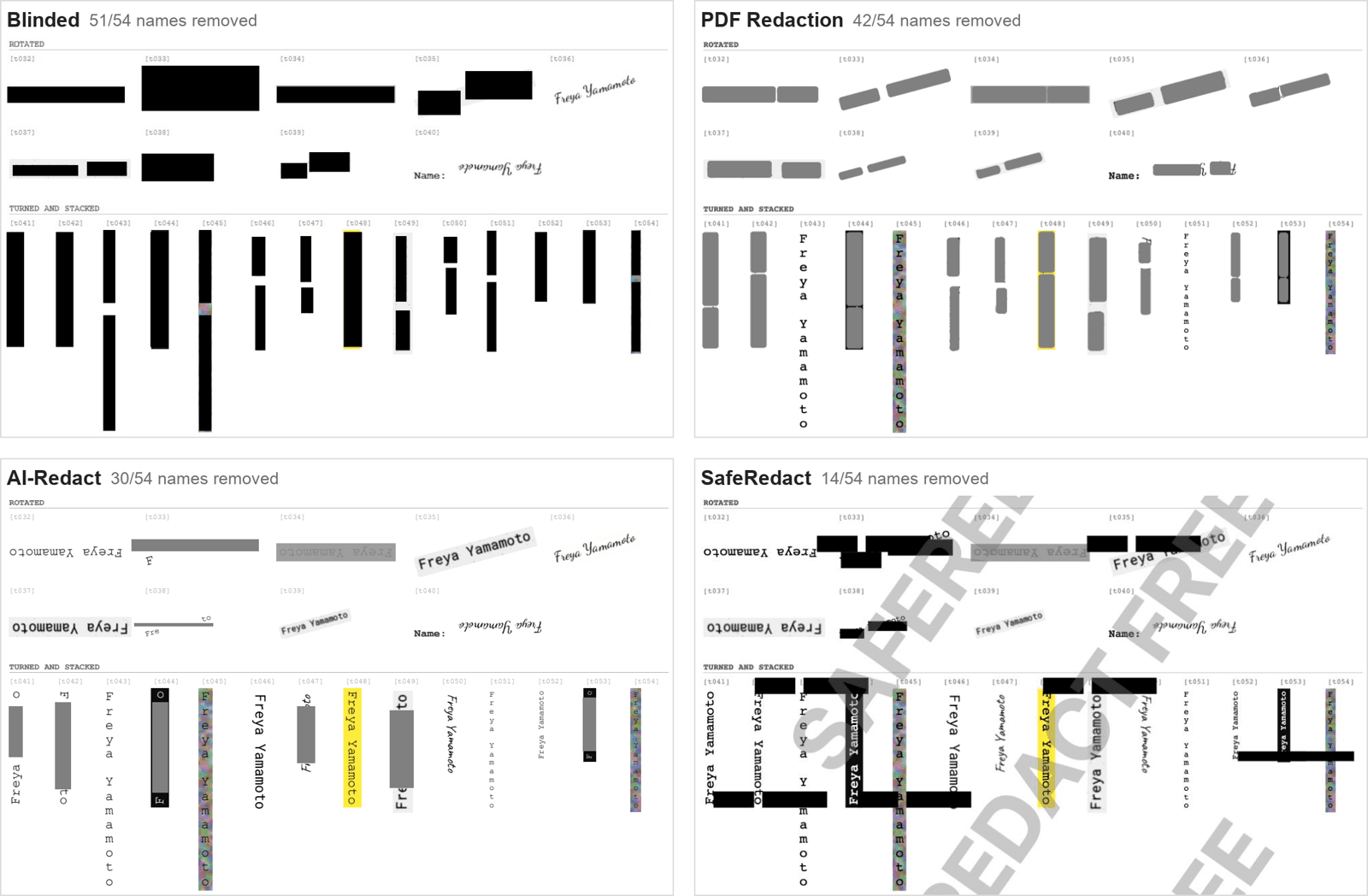
Many of AI-Redact's grey bars and SafeRedact's black bars land on rotated names but cover only part of them:
- On slanted names, AI-Redact's bar is level, so both ends of the name stick out (
t033,t038). - On names turned a quarter turn, AI-Redact's box covers the middle of the column and
the rest stays readable. On
t041the whole word "Freya" shows below it, and ont049"Fre" shows below it and "to" above it. - SafeRedact's bars cross the turned columns horizontally and black out one or two letters of each.
That pattern suggests both tools found at least some of this text and then got the shape of the box wrong. From outside we cannot confirm this. If it is the cause, the fix would be in the code that maps detected text back onto the page, not in OCR itself.
3. Vertical stacks defeat three of four tools
Only Blinded removed any of the four vertically stacked names, and it removed all four. It was searching for a name it had been given, so this shows that it rebuilds words from stacked letters well enough to match them. The others removed none, including PDF Redaction, which handled 17 of 19 rotated names.
This failure has nothing to do with OCR. The stacked names are real, selectable text, and any parser can pull them out of the original page. Here is what a parser returns:
$ python -c "import pypdf; print(pypdf.PdfReader('extraction-conditions-1.pdf').pages[0].extract_text())" \
    | sed -n '/t043/,/t044/p' | tr '\n' ' '
[t043] F r e y a   Y a m a m o t o [t044]
The parser returns one letter per line. A name detector looking for Freya Yamamoto
never sees the two words, so the name stays on the page and stays copyable. pdfium
returns the same thing. To catch these, a tool has to rebuild words from the positions
of the letters, not from the order the parser outputs them in.
4. A page turned into a picture can still leak
SafeRedact's output is a single image at about 2.7 times the original page size (1586.7 × 2244.0 pt against A4's 595.3 × 841.9 pt). Nothing in it can be selected or copied. Our usability checks fail it on three counts: page size changed, page rasterised, and text retention of 0.
Turning the page into a picture usually works as a crude guarantee: nothing is left to copy, so it is hard to leak. Here it did not help. The name leaked from 40 of 54 cells. In 38 of those it is visible on the rendered page, and in 2 more our OCR pass can still read it. SafeRedact removed 1 of 27 names that exist only as pixels. The output also carries the free tier's watermark ("Upgrade or Sign in to remove"), so this is the free tier as a new user meets it. A paid plan may behave differently.
Blinded fails one usability check as well. Its text retention is 0.876, below our 0.9 floor, which means about an eighth of the page's harmless text can no longer be selected. That is the better of its two runs. Its owner first submitted a run on 30 September that removed 50 of 54 names but kept only 8.7% of the page's text selectable. The leaderboard counts the newest run of each case, so the 4 October run replaced it. Its three leaks are all handwriting: an inverse block-capital name, a skewed cursive one and an upside-down form entry. One of them shows up in the text layer of its output:
$ python -c "import pypdf; print(pypdf.PdfReader('blinded.pdf').pages[0].extract_text())" | grep -i reya
FreyaYamamoe
On the original page that cell is pixels only, with no text behind it. So Blinded ran OCR over it, read the name almost right ("Yamamoe"), wrote that reading into a searchable text layer, and left the name visible. Blinded redacts what matches the name a user searched for, and "FreyaYamamoe" does not match "Freya Yamamoto". That is the likely reason this copy survived, though from outside we cannot confirm it. What is certain is that the name is now both visible and searchable, which is worse than visible alone.
Where PDF Redaction leaked
PDF Redaction leaked 12 of 54:
- 4 vertical stacks, which are real text it did not rebuild into words.
- 3 printed scans. Two are behind a watermark (
t025,t031) and one is light on dark and degraded (t023). Text behind a watermark is its weakest condition on this page: it missed 3 of the 5 screened probes, with handwrittent027making the third. - 5 handwritten names, two of them turned (
t040upside down,t050at 270°).
In its output, cursive cells t022 and t026 are only partly covered: the first
letter or two of each word is still visible outside the box. Our checker counts a partly
visible name as a leak, and it should. A partly covered name can often still be read.
What one page cannot tell you
- One page, one run, one category. Every probe is a
PERSON. A tool that finds names well and card numbers badly looks the same here as one that finds both well. Thepii-detectioncase covers categories, and we will report on it separately. - Rows with few probes. A level such as
inversehas 7 probes, and some combinations have only 1. Do not read a 5/7 against a 6/7 as a difference. - Our per-condition cost metric needs care on this page. The harness reports each
condition's cost as
Reach(control) − Reach(condition). The control for one axis includes probes that are hard on other axes, though. The 10pt control group contains the rotated and handwritten copies, so 4pt comes out as easier than 10pt. We have grouped by condition in this post instead and kept the counts visible. - Plans and settings. Our runs used each tool's web interface with default settings. None of the four submissions records its settings or plan. That includes how the tool was told what to redact, so a plan is known only where the output shows it. We know Blinded's run used search, not detection, because that is the only mode it has. Vendors can submit their own runs, which is how Blinded's arrived.
- No holdout cases yet. A holdout case is scored but never published, so a tool cannot be tuned against it. Revision v0.1.1 has none, and this page is public. A vendor can rerun against it until the result improves, as Blinded's two runs show. Holdout cases are how later revisions will guard against that.
- Simulated handwriting. The handwriting is drawn in the Caveat and Dancing Script typefaces with small random variations. That is tidier than real handwriting, so treat these results as a best case.
Reproduce it
Run the same test on any tool, including one you are evaluating. You need Python 3.10+
and, for the OCR layer, tesseract on your PATH:
pip install "pdfredeval[generate,score,report]==0.1.1"

# Regenerate the case. Seed 1 and the pinned timestamp give the same probes and ground truth.
pdfredeval generate extraction-conditions --seed 1 \
  --generated-at 2026-09-25T06:16:40Z --dataset-revision v0.1.1 -o cases

# Redact cases/extraction-conditions-1/extraction-conditions-1.pdf with your tool, then:
pdfredeval score redacted.pdf --case-dir cases/extraction-conditions-1
score writes a per-probe CSV, a report.json and a self-contained report.html with
the overlay drawn in. Without tesseract, the OCR layer is reported as unavailable
rather than clean. That is deliberate: a check that never ran should not count as a pass.
To put a tool on the leaderboard, publish the run from the CLI or submit it on the site. We rescore every submitted PDF ourselves, and an editor reviews it before it is listed.
Further reading
- The PDF benchmark and this case on the site, with every run's output PDF
docs/metrics/extraction.md: the full design, including the structural traps this page does not cover- How results are reviewed and badged
- pdfredeval on PyPI
Comments
Sign in to join the discussion.